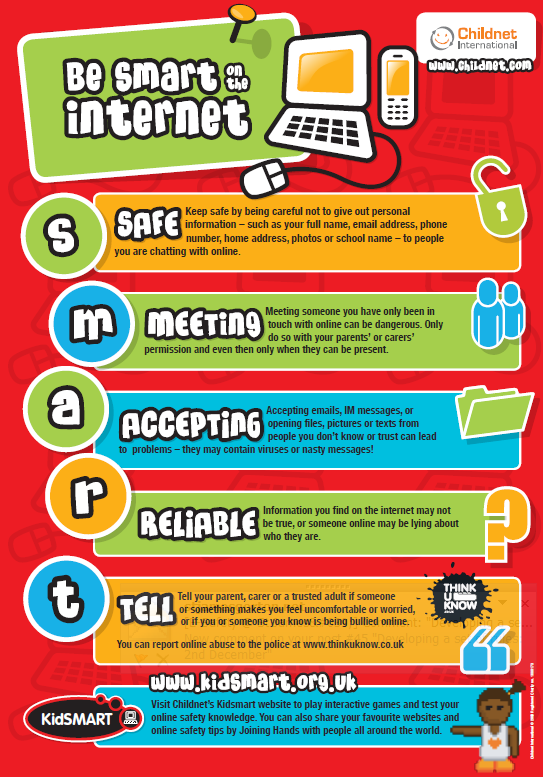
It’s a wonderful world online, full of amazing opportunities to learn, create, and connect with friends. But just like in the real world, it’s important to know how to keep yourself safe. Online safety isn’t about being scared; it’s about being smart and confident.
Here are a few simple tips that every student, from primary to secondary, can use to stay safe online.
1. Think Before You Click or Share
The internet is a busy place, and not everything you see is true.
- For our younger students: Imagine the internet is a street. You wouldn’t follow a stranger down a new road, so don’t click on links or open files from people you don’t know.
- For our older students: This includes suspicious links in emails, on social media, or in pop-up ads. Scammers are clever, so take a second to check if a website looks real before you log in or share any information. Once you post something, it’s out there for good—think about how it might look to future friends, colleges, or employers.
2. Keep Your Personal Information Private
Your personal information is like a key to your house. You wouldn’t give it to a stranger, so don’t share it online.
- For everyone: Never share your full name, home address, phone number, or school name with people you don’t know in real life.
- For our older students: Be careful with your passwords. Use a different, strong password for each account and never share it, even with your best friends. Check your privacy settings on social media and gaming apps to make sure you’re in control of who can see your information.
3. Be a Good Digital Citizen
The same rules about kindness and respect apply online as they do in person.
- For everyone: Be kind in your messages and comments. It’s easy to misunderstand someone online, so always be respectful. Don’t say or do anything to someone online that you wouldn’t say to their face.
- For our older students: If you see online bullying, don’t join in. Instead, you can report it on the platform or tell a trusted adult. Your actions have an impact, so use your voice to be a positive force.
4. Talk to a Trusted Adult
If something online makes you feel uncomfortable, worried, or sad, it’s not your fault, and you don’t have to deal with it alone.
- For everyone: Find a grown-up you trust—a parent, a teacher, or another family member. They are there to help you.
- For everyone: There are also amazing UK organisations you can turn to for help and advice:
- Childline (Call 0800 1111)
- Thinkuknow (The National Crime Agency’s online safety education site)
- Childnet (A charity dedicated to making the internet a great and safe place for children and young people)
By following these simple rules, you can make the internet a safer and more enjoyable place for yourself and everyone else. Use technology wisely, have fun, and we look forward to seeing all the amazing things you achieve online.
Top ten tips to keep you safe online
-
Keep personal information private.
-
Update privacy settings regularly. Is it private?
-
Browse safely. Don’t click on ads and pop ups.
-
Be careful what you download. Never download files from unknown source.
-
Only shop online from secure sites. Look for the padlock.
-
Don’t make purchases on public networks.
-
Choose strong passwords. Use a mix of numbers, letters and special characters.
-
Choose online friends wisely. Don’t talk to strangers!
-
Make sure anti virus software is installed and operational.
-
Think before you post. Social media posts can be used against you.

Here are some links to resources, videos and games to help keep you safe online.
SMART Rules